Logitech Pebble Mouse 2 M350s Review: The Ultimate Quiet & Portable Bluetooth Mouse
Key Takeaways
- Stylish and minimalist design available in tonal white.
- Connects easily across multiple devices with Bluetooth technology.
- Quiet clicks for a more focused work environment.
- Long battery life of up to 2 years with auto-sleep mode.
- Made with recycled materials, contributing to a sustainable future.
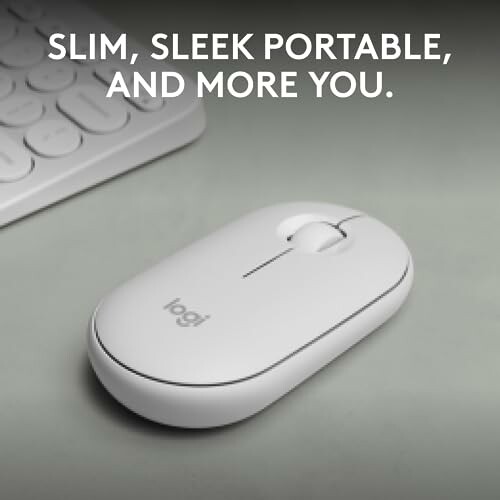
The Logitech Pebble Mouse 2 M350s is not just another wireless mouse; it's an accessory that brings a touch of elegance to your workspace. With a sleek, portable design and customizable features, this mouse caters to the needs of modern-day users who value both aesthetics and performance.
Whether you're working from home or on the go, the Pebble Mouse 2 ensures seamless connectivity across various devices. Its quiet operation allows you to maintain a distraction-free environment, making it an ideal companion for professionals and students alike.
About Logitech Pebble Mouse 2 M350s
The Logitech Pebble Mouse 2 M350s is engineered for those who desire a combination of style, portability, and functionality. This slim Bluetooth wireless mouse stands out not only for its aesthetic appeal but also for its smart technology that enhances your productivity. Let's delve into the key features that make this mouse a must-have for anyone looking to upgrade their workspace.
Design and Build Quality
The Pebble Mouse 2 boasts a minimalist round design that is both ergonomic and modern. Constructed with at least 58% certified post-consumer recycled plastic, it reflects a commitment to sustainability without compromising on durability. Its lightweight nature makes it easy to carry in a laptop bag, ensuring you can work comfortably anywhere.
Performance and Features
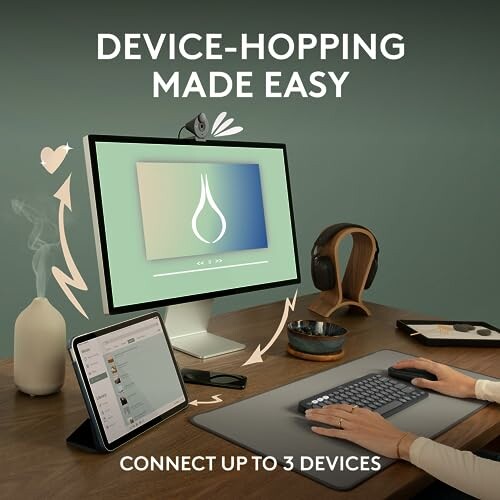
- Multi-Device Connectivity: Effortlessly connect up to three devices across different operating systems, including Windows, macOS, iPadOS, and Chrome OS. The Easy-Switch button allows you to toggle between devices seamlessly.
- Quiet Clicks: Thanks to Silent Touch Technology, the Pebble Mouse 2 eliminates 90% of click noise, allowing for a more focused work environment.
- Long Battery Life: Enjoy up to two years of battery life with the included battery and auto-sleep power-saving mode, reducing the need for constant replacements.
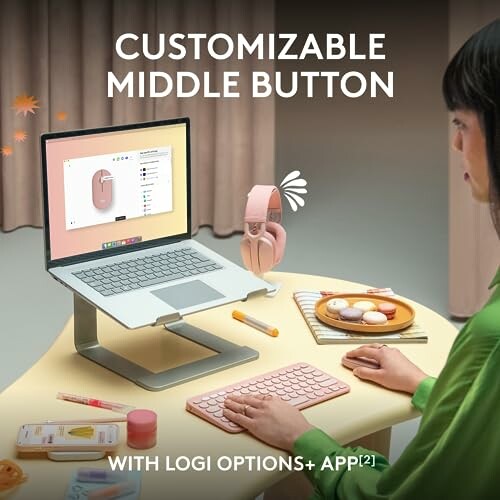
- Customizable Buttons: Personalize the middle button using the Logi Options Plus app to add shortcuts for your favorite applications, such as WhatsApp and Spotify.
Ease of Use
Setting up the Logitech Pebble Mouse 2 is straightforward. The user-friendly interface allows for quick installations, and the Logitech support team is readily available for any inquiries. The mouse is compatible with a Logi Bolt USB receiver, providing additional connectivity options.
Use Cases
This mouse is ideal for a variety of users:
- Professionals: Perfect for those who need to work efficiently across multiple devices in an office or home setting.
- Students: Lightweight and portable, making it a great companion for study sessions at libraries or coffee shops.
- Digital Creatives: With customizable buttons, it's suitable for graphic designers and content creators looking for efficiency.
 Check Current Price
What makes the Logitech Pebble Mouse 2 stand out?
Pros
- Stylish and sleek design available in tonal white, enhancing your workspace aesthetics.
- Lightweight and portable, making it easy to carry for on-the-go use.
- Quiet clicks thanks to Silent Touch Technology, perfect for maintaining a focused environment.
- Long battery life of up to 2 years with an auto-sleep mode, reducing the hassle of frequent replacements.
- Multi-device connectivity allows seamless switching between up to three devices across various operating systems.
Cons
- Requires external software for full customization features, which might not be convenient for all users.
- Logi Bolt USB receiver not included, which may be necessary for some users.
- May not suit users who prefer a more traditional or larger mouse design.
Overall, the Logitech Pebble Mouse 2 M350s impresses with its stylish design, remarkable functionality, and versatile connectivity options, making it an excellent choice for anyone in need of a reliable and quiet wireless mouse.
Final Thoughts on the Logitech Pebble Mouse 2 M350s
Tips for Buyers
- Consider your primary devices and ensure compatibility across operating systems.
- Look for a mouse that fits your hand comfortably, especially if you'll be using it for extended periods.
- Check if you prefer customizable buttons for easier access to your most-used applications.
- Evaluate the importance of quiet clicks if you'll be working in shared or quiet environments.
- Avoid common mistakes like overlooking battery life; choose a product that offers long-lasting performance.
In summary, the Logitech Pebble Mouse 2 M350s combines style and functionality, making it a great addition to any workspace. Its quiet clicks enhance focus, and the multi-device connectivity ensures effortless transitions between devices. While it may require additional software for full customization, the benefits far outweigh the drawbacks.
If you're in the market for a sleek, portable, and efficient mouse, the Logitech Pebble Mouse 2 M350s is highly recommended. Its eco-friendly construction and long battery life further reinforce its value. You can explore more options in our Christmas Crafts & DIY Kits or Unique Gift Ideas sections to find the perfect gifts for your loved ones this season.
Ultimately, the Logitech Pebble Mouse 2 M350s is not just a tool; it's a statement piece that reflects your taste and enhances your productivity. Make your workspace feel special and efficient with this elegant accessory.
Check Current PriceYour Queries Answered: Logitech Pebble Mouse 2 M350s
-
Q: Is the Logitech Pebble Mouse 2 compatible with my device?
A: Yes, it's compatible with multiple operating systems including Windows, macOS, iPadOS, and Chrome OS.
-
Q: How do I connect the mouse to different devices?
A: You can connect up to three devices using Bluetooth and switch between them with the Easy-Switch button.
-
Q: What is the battery life of this mouse?
A: The Pebble Mouse 2 can last up to two years on a single battery, with an auto-sleep mode to save power.
-
Q: Are the clicks really quiet?
A: Yes, thanks to Silent Touch Technology, it reduces click noise by about 90%, making it suitable for quiet environments.
-
Q: Can I customize the buttons?
A: Absolutely! You can use the Logi Options Plus app to personalize the middle button and create shortcuts for your favorite applications.